Bitmap fonts—a technology overview
by David JonesSynopsis
I wanted to make another bitmap-like font. The particular font i wanted to make wasn't a bitmap font, but had a bitmap core that i intend to transform to make the final font.
So instead of doing that, i started researching existing bitmap font formats, in the hopes of avoiding making yet-another ad-hoc bitmap format (for example, Python strings using "-" and "X"). My use case means that i'm more interested in stable storage and transformative uses than installing and displaying.
The answer is BDF; and actually i made a BDF-like format that i translate into BDF.
The notes became a bit long and rambling. They still are, but i am now putting the useful conclusions at the top.
Summary results
Here is a table of capabilities for a selection of the more capable font formats.
- Prop: Proportional (not monospaced);
- Strike: Different sizes and/or resolutions;
- Style: Style information exposed in file format;
- Offset: the inked image is offset from the pen position, for supporting italic fonts;
- Colour: some sort of colour and/or grayscale support.
                    Prop   Strike Style  Offset Colour
    ---------------+------+------+------+------+-----------
    BDF/X11        |Y     |1-per |1-per |Y     |N?
    TrueType       |Y     |enc   |1-per |?     |Y
    Apple NFNT     |Y     |enc   |?     |Y     |Y
    Windows FON    |Y     |enc   |?     |?     |?
    Amiga font     |Y     |?     |?     |?     |Y
    Plan 9         |Y     |1-per |1-per |Y     |Y
There are more details and explanation in later parts of this document.
- "1-per" means 1 strike or style per file, like BDF; as opposed to...
- "enc" which means several strikes or style enclosed in the same file.
- "Y" means Yes.
- "?" indicates my lack of research not the actual unknowability.
What to choose for a particular task would depend a lot of other factors not listed here explicitly.
For a general purpose font-rendering system TrueType looks like a pretty good choice.
For editing however, TrueType is; a) a bit of a pain; and, b) probably requires the editor to store additional information "on the side".
Font formats that allow many strikes in one file are convenient for distribution and intallation.
BDF has one advantage not listed in this table.
It's plain ASCII text.
I'm fond of that and means it is editable with ordinary Unix tools;
and grep and awk can be used for simple searching and inspection.
I created a mild extension of it that uses
one byte per pixel to make editing by hand easier.
BDF has the disadvantage of not being current; basically no widespread modern systems work with it. A lot of the others share the same fate: NFNT, Windows FON, Amiga font, and Plan 9.
BDF is pretty simple and that has meant that ad-hoc tools have sprung up around it. And in fact, many of the original ones still work.
All of the font formats here have more features than i've listed (probably), but BDF has a couple of flexible features that aren't that common in other formats:
- arbitrary metadata in the form of properties;
- comments in the file.
Both of those are useful for interchange and extension.
So that‘s my primary conclusion and the most useful part of my notes: I am going to use BDF. The rest of this article is background and more detailed (but often not very interesting) notes i’ve found on various formats. It’s not particularly comprehensive.
What is a bitmap font?
Bitmap fonts are those fonts that are represented as pixels. Here’s some pixels:
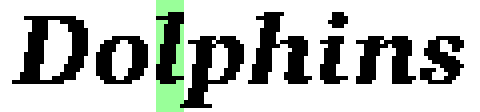
This is a 4x blowup, so that you can actually see some pixels on a modern display, but the original is 24pixels from the bottom of the /p to the top of the /l. If you were using this size back in 1994, that would have been considered obscenely luxurious. The green stripe is there for a later mention of italic fonts.
In a bitmap font each glyph is essentially a small pixel image. In the strict sense a bitmap font should be bi-level (on or off): the images are bitmaps. But pixels now come in many colours, and as mentioned in the Terminology section below, not all bitmap fonts are in fact bi-level, but the name sticks.
Bitmap fonts were common in the last 25 years or so of the 1900s, but have largely been displaced in the 21st century by scalable font technologies (PostScript Type 1, TrueType, OpenType). Bitmap fonts do still have a niche in areas like LED and LCD matrix displays and faux-retro computers.
Bitmap fonts have a unique aesthetic, and so they, or more-or-less faithful reproductions, remain in use for artistic purposes. Perhaps giving a 1980s or retro vibe.
Bitmap fonts were used on a diverse range of systems, and this has resulted in an equally diverse range of storage formats and font file-formats.
A note on terminology
Pixel: short for Picture Element, the smallest visible element of a raster display. Often conceptualised as a square, but in practice will be a variety of dot shapes that merge together in a typical raster display. On a raster display, pixels are laid out on a X–Y grid; while many displays have square grid spacing (same X- and Y- resolutions), many will have different X- and Y- resolutions, making the grid rectangular.
Glyph is a single inked shaped that can be rasterised or stroked onto a display system. Older system sometimes used character for this concept, but this is now avoided as it is inadequate for typography and some languages: for example the /f_i ligature may be one glyph, but represents two characters (/f and /i drawn together as a unit); in Welsh /l/l is two glyphs, but counted as one character (in the dictionary and for word length), and other languages may have similar examples.
Bitmap font should strictly refer to a font that has 1-bit per pixel, and is therefore bi-level, in practice (and in this document) it will also be used to refer to fonts having more than one bit per pixel.
The number of bits per pixel is called depth.
Fonts with depth > 1 may be colour or greyscale.
A strike is an instantiation of a font at a particular size and resolution. Depending on the font technology, the size may be in notional points (1/72th of an inch in digital systems; either exactly or approximately), pixels (72 ppi on Apple systems, around 96 ppi on PC/VGA/X11 systems (often assumed or implied)), or device units. In traditional metal typesetting a strike was the term used for a font produced from a metal matrix at a particular size.
Not all font technologies and formats use the strike terminology, but Apple TrueType does, and it's quite useful.
typeface vs font:
there is a certain sector of the font design community that uses
the term typeface to mean a related collection of fonts.
Typically corresponding to an idealised design that
is realised with multiple fonts at various sizes.
There is also a slightly smaller group that use the terms
the other way around.
Then there is me who tends to use "font" fairly loosely (and i claim
that the UI is on my side, the menu item is called Font).
Proportional means individual glyph widths are different; monospace is the opposite, all glyphs have the same fixed width. Fixed is actually the name of a font family distributed with X11, but also sometimes gets used to mean fixed-width, that is monospace.
Problem Envelope
The purpose of bitmap fonts is to display fonts (text material) on a raster display. Typical target raster displays are a low-resolution VDU at around 72 dpi (Apple Macintosh era) or 96 dpi (PC VGA and similar). Higher resolution devices, like 300dpi printers, would more likely use scalable fonts.
Bitmap fonts are desirable on lower resolution displays because of their simplicity. They do not require rasterising from vector outlines, and are usually not scaled. They can also be quite compact; a typical 1980s micro would use a 8×8 grid, with a single "font" of 96 glyphs at 8 bytes each, which is 768 bytes total.
Bitmap image are rasterised directly to a frame buffer at 1:1 That is their primary advantage, it is fast and efficient to display them on a raster display. Software display routines are simple (very simple for 8×8 fonts on a grid), and may be assisted by sprite or blitter hardware. Some Apple documentation hints that it is possible on their (historic) systems to rasterise at 2x (integer scaling).
Although monospace single-size fonts are well-known and very common (8×8 for micros and CGA, say) bitmap fonts are very much not-restricted to that. Higher-end workstations in the 1980s seemed to make a signature feature of having multiple high-quality proportional fonts at several sizes.
Some of the issues that naturally arise:
- expressing different strikes, both for different point sizes, and for different resolutions;
- non-square grids with different X- and Y- resolutions, for example EGA which has various modes with non-square grids;
- character set encoding;
- file formats and so on;
- efficiency;
- various other metadata (for example, name, style linking Regular/Italic/Bold/Bold-Italic, linking with printer-installed PostScript fonts or other entities)
The simplest approach, often taken by the 8-bit micros, is a single 8×8 monospace single-weight font of 96 or 128 (or 64 or 256 or some other "convenient" number) characters. Stored in ROM.
More serious use involves multiple fonts in various designs, styles, sizes. Which means, metadata. Metadata is used at the font level (style, size, and so on), the family or collection level (name, and identifying the font instance members), and the glyph/character level (size, name, encoded code value).
Which is to say that a bitmap font is more than just a sequence of images.
Consequently the font formats used for bitmap fonts beyond the simplest examples tend to have capabilties to describe some or all of:
- name / family name
- style
- preferred size
- encodings
- glyph spacing and positioning
- metrics (vertical spacing, average fit)
as well as images for the individual glyphs.
Separating the spacing and positioning information from the bitmap image means glyphs can have "free space" either side (potentially useful for /space and narrow glyphs like /exclam). There is a space and a runtime saving here because you don't need to store columns of blank pixels, and don't need to draw them.
A simple system for bitmap display can render text by placing images side-by-side. That is okay, but means that white-space between letters needs to be explicitly encoded in the image. Allowing the image to be offset from the pen position, and having a separate width not related to the image width, means that images need not exactly abutt, and whitespace betwen letters is implicit.
A negative offset, which a lot of formats allow, means glyphs can overlap. This is useful for the slopes of italic styles, where the adjacent glyphs can overlap in their bounding boxes. And it may also be useful in upright styles for hooked glyphs like /f or /j.
In the Dolphins example above, the green stripe is the bounding box
for /l and if you look closely you see that the bottom of /p,
the next glyph, intrudes into the green stripe.
This is possible because the glyphs are drawn with overlapping
bounding boxes.
Having a separate image offset makes for a space saving, at least when compared with hypothetical systems that demand that the entire image for a glyph be stored including its adjacent white space. However, actual font formats often add so much more metadata that any potential savings are either tiny or lost altogether. Possibly the runtime savings (of avoiding drawing blank pixels) are more worthwhile.
One can model a bitmap font as a sequence of images plus metadata, but it is not common for a font to be stored in a file like that. Notable exceptions to that are Plan 9, which stores a font directly as an image with metadata immediately following; TrueType/OpenType has quite a few ways of storing bitmap fonts and some of them put image files inside a TrueType container; the GDOS format used on the Atari ST contains an image for the pixel data.
formats
Primitive systems may have just a single ROM font. It doesn't need a name or metadata or anything; the encoding is implicit. Just a fixed number of 8×8 glyphs stored in 8 bytes each.
You need a font file format when you have more sophisticated typography—like multiple styles, proportional spacing, special symbols—and you have an idea of font interchange: that is end-users or (independent) software vendors who can source or produce their own fonts.
I suspect one important factor here was commercial. Many of the systems in the 1980s were built from software components supplied by commercial vendors. A graphical system may be sold by one vendor and incorporated by a workstation manufacturer. And it seems that sometimes the font subsystem was also licensed or sub-licensed separately. In such a situation it would be sensible to use and document a font format so that workstation builders could use their own fonts (or tweak supplied ones).
Luckily, there are lots of font formats to choose from.
Font File Formats
First, Font non-formats. This section briefly discusses a few ways you can have a font that is not really in a font-format.
The ROM Dump. 128 8×8 glyphs at 8 bytes each, occupying 1024 bytes of ROM. The exact details may vary a bit from system to system.
A spritesheet. It is similar-in-spirit to the ROM dump: all glyph images placed in a single image. Metadata on the side, or implicit understanding, tells you the coordinates and metrics of each glyph.
UFX from UXN/varvara codifies a minimal version of this:
256 bytes of width information, followed by 256 8×8 images.
Plan 9 has an only slightly more nuanced version of this: a font is an image file with some metadata immediately following (and is an officially documented format).
TrueType
Apple’s TrueType format has grown into OpenType which can represent fonts in many different formats. TrueType is so complicated that it has internal formats, and it isn’t accurate to talk of “a TrueType font format”: there are several choices for both bitmap fonts, and vector outline fonts; and they can and do co-exist within the same containing TrueType file.
TrueType is notable for being a present day (2026) font format; it evolved into OpenType but for most practical purposes the file formats are interchangeable. In 2026 it is mostly used to store vector outline fonts, and it is not clear to what extent modern platforms support the rendering of bitmap fonts stored in TrueType files.
TrueType is also notable for being very widespread; or at least, its succesor OpenType is. It basically won the format wars, and is supported as a principal font format in all the modern OSes (Windows, macOS, Linux; mobile font equivalents), prevalent across the web as webfonts, and is also supported on many esoteric OSes (like Haiku) including being a post-market addition to some retro OSes (like AmigaOS and RiscOS).
Although now it is not common to store bitmap fonts in TrueType,
it used to be.
One convention is to call such font files OTB, and use the
file extension .otb, for Open Type Bitmap.
For example, monobit,
fonttosftn, and bitmapfont2otb all use this convention.
The monobit documentation that desktop Linux can render these.
Fonts can be proportional.
Several strikes (pixel sizes) of bitmap fonts can be stored in the
same .ttf file (as well as vector outlines).
In the Classic Mac OS era when these fonts were popular, the bitmap strikes
would be used for their respective sizes on screen, with the vector
outlines being scaled for larger sizes and for printer use.
In Apple TrueType bitmaps can be made for different pixel resolutions in
both X and Y (non-square pixels, for example EGA’s 640×350 or 640×200
modes) and for bi-level and colour (for example, greyscale, but also
full colour).
See the bloc and bdat tables in the Apple TrueType specification,
which are correspondingly complex.
An equivalent capability is provided in the OpenType tables
EBDT for greyscale, and CBDT for colour.
With associated other tables, as is traditional in TrueType/OpenType.
BDF / PCF
Bitmap fonts for X11 Windows.
BDF and PCF are described together; BDF is ASCII and PCF is its binary compiled form and they are treated almost identically.
In the 21st Century, bitmap fonts on X11 have generally been superseded by scalable fonts, for example TrueType.
BDF fonts are bilevel bitmaps that can be proportional or monospaced. Can represent different sizes and resolutions, with at one strike per file.
No intrinsic linking of styles or strikes, but in practice for X11 style linking information for the XLFD is taken from the BDF properties section.
It supports image offsets, including negative ones. Allowing italic glyphs (and others of course) to overlap.
Typically the encoding is ISO-8859-1 or another 8-bit encoding, but the system is flexible enough to be anything, and there are some asian fonts with Korean and JIS standard encodings, and some Unicode fonts.
BDF, The Glyph Bitmap Distribution Format, is an Adobe file format; last updated in 1993. Wikipedia notes: https://en.wikipedia.org/wiki/Glyph_Bitmap_Distribution_Format Adobe TechNote 5005 spec: https://adobe-type-tools.github.io/font-tech-notes/pdfs/5005.BDF_Spec.pdf
From reading the Adobe BDF spec, there are hints that the intended use of this format (supplied on 9-track magnetic tape, haha!) is to distribute fonts to system vendors who will integrate them into their own compiled format; as opposed to end users obtaining their own bitmap fonts. In the X11 world, that compiled format became PCF. BDF files are also intended to be used alongside PostScript files; for example the spec mentions AFM files, and matching PostScript names.
The Adobe TN 5005 spec for BDF documents version 2.2, which includes more generous length limits on many fields, and also a vertical writing direction. I did not find any implementations of the vertical writing direction (or fonts using it).
The FontForge greymap font document
says that Microsoft extended BDF to make version 2.3, adding an optional
bitdepth parameter to the global SIZE keyword;
and it claims to support this extension.
I've not (yet?) found links to any other documentation of this.
Markus Kuhn has an old but comprehensive page on Unicode extensions to X11 fonts; a lot of BDF resources, including many BDF files: https://www.cl.cam.ac.uk/~mgk25/ucs-fonts.html
FontForge has some notes on the PCF format: https://fontforge.org/docs/techref/pcf-format.html . This is what the Wikipedia page refers to and appears to be the best easily accessible reference.
The X11 Font Server protocol document
has, in a diagram, an intriguing list of plausible
font formats that the Font Sever may be processing:
bdf, snf, pcf, atm, f3, dwf.
snf is an older PCF-like format, pcf is the compiled form of BDF.
ATM is perhaps Adobe Type Manager, and f3 is an outline format from Folio
(Folio Font Format = f3, presumably); in both cases the expectation is that
the X Font Server calls on ATM or F3 code to convert outlines to the
requested bitmaps (for X11).
I'm not sure about dwf.
"Complete" PCF archive: https://github.com/Tecate/bitmap-fonts/tree/master
Windows FON
Windows Knowledge Base https://web.archive.org/web/20080115184921/http://support.microsoft.com/kb/65123
Two versions, NE and PE; essentially they are resources packaged as executable files. Simon Tatham has some conversion utils: https://www.chiark.greenend.org.uk/%7Esgtatham/fonts/
Looks like it's one strike per file, with some style metadata.
The documentation appears to have fields for colour fonts, but i’ve never seen anyone mention colour fonts in a Windows 3.0 era context.
.PSF PC Screen Font
https://en.wikipedia.org/wiki/PC_Screen_Font
"is a bitmap font format currently employed by the Linux kernel for console fonts."
Bi-level, monospace, fixed metrics.
This is of interest because one of the still-current uses of bitmap fonts is for the console mode of Linux.
Two major formats: 1 and 2, aka PSF1 and PSF2. Generally PSF2 is bigger and more capable.
In PSF1 every glyph is 8×H, and in PSF2 every glyph is W×H (metric data in header).
PSF1 fonts are exactly 256 or 512 entries.
Can have a unicode table (to map glyphs to unicodes) in either PSF1 or PSF2. PSF1 uses 16-bit Unicode codepoints (it is not clear if it can access the astral planes); PSF2 uses UTF-8 (so can more clearly access the astral planes).
Apple FONT/NFNT
https://fondu.sourceforge.net/index.html is my current best link for this. This is a set of tools for handling FOND files and related Macintosh formats, create by George Williams—the original author of what is now FontForge. (FWIW the tools nearly compile on my MacBook Air in 2026; some linking issues, and some of them do compile)
Apple Developer documentation: The Bitmapped Font ('NFNT') Resource
Before TrueType (and outline fonts) Apple stored bitmap fonts
in the NFNT resources (and before that in FONT resources).
In the Macintosh era files have a data fork and a resource fork;
application resources, like icons, are stored in the resource fork.
Some files, like font files, had only resource forks and not a data fork.
The collection of NFNT resources making up a font is
described by FOND resources.
It supports strikes and styles.
One NFNT resource describes a single bitmap strike;
a FOND resource describes a font family, with links to
associate resources for particular sizes and styles
(which can actually also include vector outline strikes in a
sfnt, which is a TrueType file in a resource!).
The bitmaps in a NFNT (or FONT; they seem to be identical) resource
are stored in a single very wide image, with an offset table
to indicate the subimage corresponding to each glyph.
Similar in spirit to Plan 9.
I may have to do more digging around ancient Apple documentation for this.
GDOS bitmap .FNT
Used by GDOS on Atari ST which ran on the GEM operating system environment.
The extension .FNT is of course not likely to be
unique to this file format.
Reasonable description seems to be here: https://temlib.org/AtariForumWiki/index.php/GDOS_Font_file_format
It's binary, supports encoding using 16-bit codepoints (not Unicode, given its vintage). Proportional, and supports italic fonts with a baseline horizontal offset. And an apparently little used per-glyph horizontal offset.
The actual bitmap data is stored as a single image, with widths in a side table.
Plan 9
See font(6) in the Plan 9 man pages.
In Plan 9 bitmap fonts are an extension of its image format, appending font metric data to an ordinary Plan 9 image file. Several font image files, each one is technically called a subfont, can be collected together into a single font described by a simple text file which assigns a contiguous unicode range to each subfont.
Supports greyscale fonts for anti-aliasing.
Proportional, and supports image offsets.
Style linking and strikes seems to be ad hoc.
Amiga .font files
Although not used outside of the Amiga ecosystem, this is notable for supporting colour fonts, and having a community that actually uses colour fonts; for colour display, rather than anti-aliasing.
Big zip of color Amiga fonts:
https://www.stone-oakvalley-studios.com/uploads/000913112022231233/amigacolorfonts_archive_by_stone_oakvalley_2022.zip
and more related stuff https://www.stone-oakvalley-studios.com/post.php?id=000913112022231233
Some notes on the file-format itself in a 3-part blog series: https://andrewgraham.dev/blog/amiga-bitmap-fonts-part-3-the-font-descriptor-file/
vfont
[added 2026-09]
A note in the xmbdfed README suggests that Sun console fonts are in vfont
format. Archive team has a brief summary of vfont:
256 bitmap glyphs, proportional spacing.
Seemingly no support for any meta like names, encoding, styles.
SunOS 4.0 had a man page for vfont, which probably describes enough of the format to decode it. Comes in two fun endiannesses.
Magic number is 0x1E 0x01, that is the little-endian encoding of the octal Magic Number 0436 in 2 hexadecimal bytes.
The vfont format apparently originates at BSD and vfont.tar.gz in this 4.2BSD distro has hundreds of examples.
monobit can ingest vfont format (or at least
the half of those in the tarball above that don't have a final r in their filename).
xmbdfed claims to be able to, but cannot; i'm investigating.
SGI
A number of SGI users fondly remember its terminal font Screen which is available in a PSF version, along with other fonts, here https://github.com/Tecate/bitmap-fonts/tree/master/bitmap/sgi
There is a BDF version at https://github.com/masaeedu/bitmap-fonts (along with many others).
Although no clue on original font formats.
There is a font called screen8x16.bdf and screen8x16b.bdf on discmaster, and it is not SGI screen. Though it does look reasonably clear.
Bonus font file formats
These are not particularly associated with any vendor or workstations.
UFX
"UFX is a proportional font format."
https://wiki.xxiivv.com/site/ufx_format.html
UFX is shorthand for 3 formats, .uf1 .uf2 .uf3, corresponding
to glyphs stored in bitmaps of 8×8, 16×16, 24×24 respectively.
There are exactly 256 glyphs, and their widths are stored
in the first 256 bytes of the file.
Bilevel. Proportional. Strikes and style linking are ad hoc at best.
All bitmaps are stored "full-width" even though the glyph may be narrower. Image offsets not supported.
This forms part of the UXN/Varvara ecosystem, and is in my opinion unlikely to be found outside of it (although some discussion suggests that it might be as it is suitable for plausible range of constrained and/or embedded systems).
Although modern, it represents only one step beyond the 8-bit non-format idea of monospaced 8×8 glyphs.
Only 3 heights are supported; no information about baseline, x-height, cap-height. No information about encodings. Only 256 glyphs per font.
Fixing the widths of all the bitmaps even when the
glyph is smaller (e.g. storing a 3×16 /exclam in a 16×16 bitmap)
is in principle wasteful; but,
its simplicity makes up for the waste:
.UF3, the largest format, is still < 17KB.
.hex format
https://en.wikipedia.org/wiki/GNU_Unifont#.hex_format
This format was created for the Unifont project, but is also used for Unscii (a project to support ASCII/ANSI/PETSCII art using the Unicode Legacy computing range, and more) and other bitmap font projects.
It is quite limited, supporting only 2 sizes (8×8 and 8×16), and no support for names or styles or alternates or seemingly anything beyond the Basic Multilingual Plane (although the Wikipedia page has coverage for these, so presumably they are in fact encoded)
FZX
Paul van der Laan points to https://sinclair.wiki.zxnet.co.uk/wiki/FZX_format
Which is a documented hobbyist system for proportional fonts (1 to 15 pixels wide) on the ZX Spectrum.
Various limitations mean that it's probably only useful for smallish sizes.
Metagraphics
In the discussion on Fediverse someone pointed me at
https://www.metagraphics.com/metawindow/fonts/fnt-specs.htm
which appears to be a fairly complete spec for the bitmap font part of a proprietary graphics system called Metagraphics MetaWINDOW.
It's defunct. Reading around hints that Version 4.1 was released in 1992. The product itself appears to be a graphics/display library for PC-type computers. Maybe for applications like cash registers or petrol pumps that aren’t running a graphical OS.
The Metagraphics font format appears to have reasonable support for:
- proportional fonts
- multiple styles
- strikes / sizes
- negative offsets for italics
SFD
Again in public discussion, someone suggested SFD as a bitmap font format.
SFD is the native storage format for the font editor FontForge:
Spline Font Database.
Since FontForge can edit and create bitmap fonts that does technically make it a bitmap font format. But practically, no one would use it directly, they would use FontForge to edit the font and then compile into one of the other font formats.
yaff
[added 2026-07]
https://github.com/robhagemans/monobit/blob/master/YAFF.md
Ironically i think i had earlier passed over this as
yet another font format, which is exactly what yaff stands for.
It comes from the stable of robhagemans and while parochial
the scope of the monobit tools
is extensive enough to make it notable.
Basically they can convert anything to anything, with an explicit aim of preserving all metadata (and being human editable).
Hardware and Systems
Where do all these formats come from?
Font processing systems live inside larger (operating) systems often embodied in particular hardware. This section is my notes for generating research leads, and has only been slightly tidied up. Caveat lector.
8-bit microcomputers
The microcomputer revolution started in the 1970s but became immensely popular in the 1980s. Initially with 8-bit microprocessors and then later with more powerful 16- and 32-bit microprocessors.
Apple II, ZX Spectrum, Commodore 64, BBC Micro, and so on.
Very commonly these system had a single 8x8 font, generally not named, and generally defined in ROM. Sometimes several machines from the same manufacturer will use the same or a similar font (for example, with regional variations).
For this class of microcomputers / font there is generally no identifiable "font-file" in a packaged format. Typically 128 or 256 glyphs are stored in ROM consecutively, occupying 1024 or 2048 bytes.
Generally no concept of strikes, name, encodings, fancy typography, or anything like that. Just a bunch of bytes in ROM.
Hardware implementations
Prior to software implementations various manufacturers made character generator integrated circuits. These would generate signals suitable for display from an internal ROM bitmap font.
The Signetics 2513 was used in the Apple I and apparently other 1970s display equipment. There is a nice summary of the Signetics 2513 in this wiki post and it also has broken links to TTF fonts. (Ben Zotto made Signetics CRT based on this character generator).
The NEC μPD7227 is an LCD controller with an integrated character generator. This was used in the 1982 Epson HX-20 portable, but the character generator is actually unused in that system.
The HD44780 is another character LCD controller, and has its own Wikpedia page (for HD44780). It appears to be current, and when i checked in 2026 it was available from AliExpress with 16x2 screen and IIC module for around GBP3.
These days, a random MIDAS small LCD panel will come with its own character generator, and they are documented in the datasheet. The one i happened to check is identical to the HD44780 pattern, so i guess it either uses it, or a knock-off. Possibly speaking to the ubiquity of the HD44780.
Teletext is another example, using the SAA5050 IC.
This is not the place for a thorough survey.
Workstations
I use the term broadly here to mean roughly "any computer more advanced than a typical 8-bit micro".
There are quite a few systems, and i found it quite difficult to find out much about their font subsystems. It is common for each system to use different font format and subsystems.
This big players here (in terms of reach and subsequent importance):
- Windows
FONformat (because Windows); - Apple FONT/NFNT (and then later TrueType);
- BDF used by X11 and many vendors of it.
A mapping of workstations (scant)
Apple Macs. See FONT/FNT and TrueType.
PC Windows. .FON (and maybe .FNT?).
Amiga. .font files. Later, scalable Agfa Intellifont files.
Atari ST. GDOS Font Format.
Xerox. (for example Alto) No idea.
GEOS. GEOS font encoding: https://github.com/kreativekorp/bitsnpicas/wiki/GEOS-Font-Format
DOS. CGA / EGA / VGA fonts were generally programmable, but don't know if there was a standard file format or utility.
Linux. Console generally uses PSF and utilities that load/save it. Generally the GUI systems used on Linux today don't use X11/BDF fonts even if they use X11; they used scalable fonts, usually TrueType/OpenType.
Plan 9. The home of Pellucida and others. Plan 9 font format documented below.
SGI. I found https://github.com/sgi-demos/sgi-fonts/tree/main/txf which may be the SGI fonts in GLUT TexFont format (texture bitmaps).
Lisp Machine. There is https://github.com/unjordy/LispM-Font which shows how ugly the font is (surprises me, given the production values generally), but no notes on format.
Oberon (from Wirth). There is some evidence in the form of BDF files that Oberon had a couple of custom fonts, but i haven't yet found any information about formats and stuff. For example https://discmaster.textfiles.com/browse/41792/ALT_LANG.iso/oo/oberon/ofront.tar/ofront/fonts.tar.gz/fonts.tar/fonts has several in BDF format, but they are converted; from what?
Sun Microsystems. X11/BDF (as above). There was a monospace console font called Galliard, but i don’t know if it was stored in any particular format or just a ROM font. Someone on the internet has done a very impressive bitmap BDF font based on Galliard.
Generic Unix workstation. Generally based on X11 and generally using BDF (usually compiled to PCF).